
Models and API keys
How a model is reached, adding providers and keys, browsing and adding models, and what Auto does.
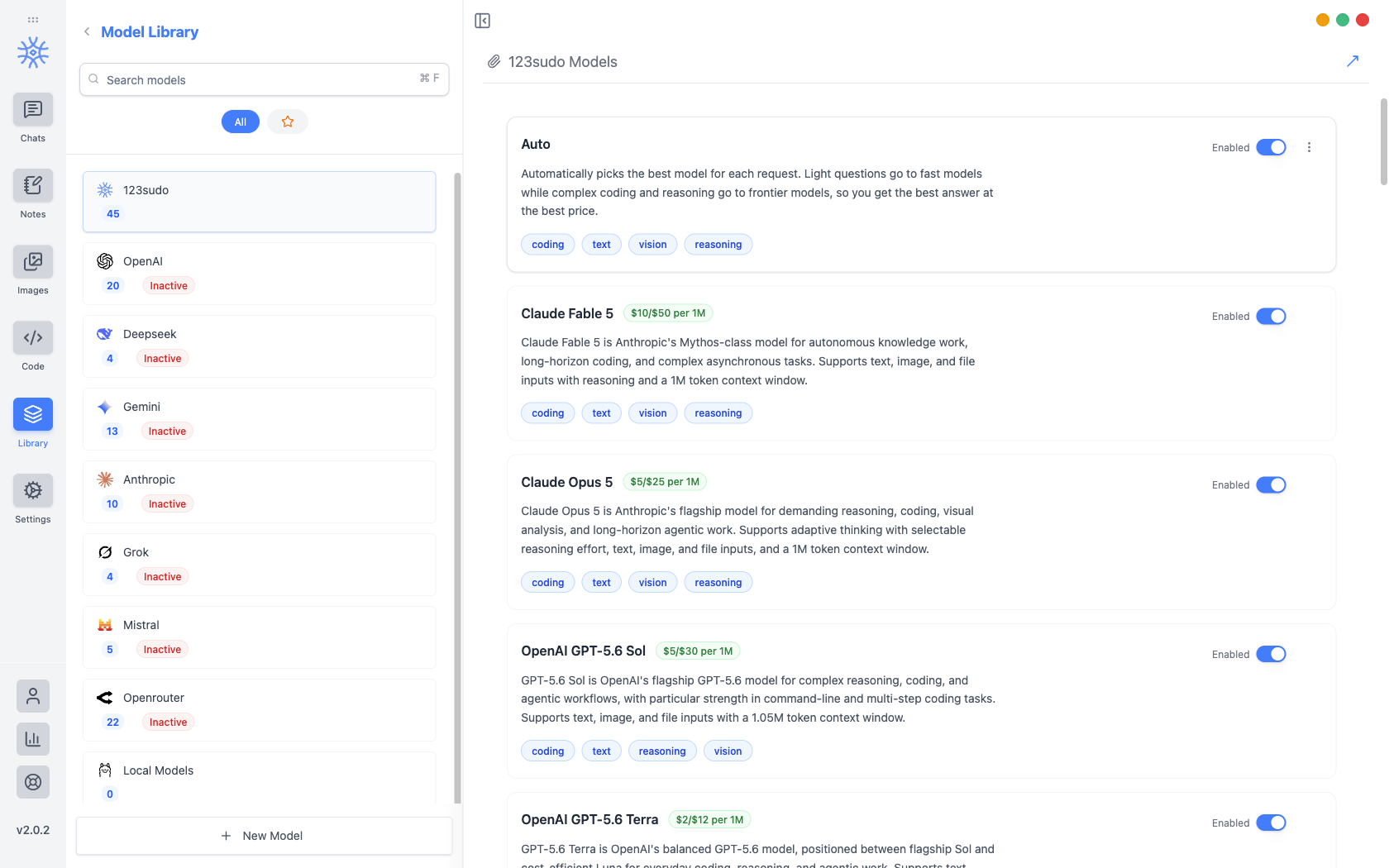
Library → Models lists every model you can pick and holds the API keys that reach them. Providers run down the left with a model count each, and a provider stays Inactive until it has a key.
Three ways to reach a model
Which one you pick decides both who bills you and what leaves your machine.
| Route | Who bills you | What leaves your machine |
|---|---|---|
| 123sudo credits | 123sudo, from your credit balance | Your message, to the provider we route to |
| Your own API key | The provider, on your account | Your message, to that provider |
| Local via Ollama | Nobody | Nothing |
Local models are set up in Local models, and the privacy trade-off is covered in Privacy.
Adding a provider key
Pick the provider, open API Configuration, and paste the key. It is encrypted before it is written, with the encryption key held in the operating system's keychain rather than in the app, so the stored file is useless on its own. If the OS cannot provide that secure storage, the app says so instead of quietly falling back to writing the key in the clear.
The provider flips to Active once a key is saved, and its models become selectable everywhere a model can be chosen.
Treat an API key like a password. Anyone holding it can spend against your provider account. It is never included in an export, and it should never appear in a screenshot or a support message.
Browsing and adding models
Browse Models fetches the provider's current catalogue (Anthropic, OpenAI, Gemini, Mistral, DeepSeek, or OpenRouter) so you can search it by name or ID and add several at once. Models already in your library are marked Added.
Fetching the catalogue is how a newly released model appears the day it launches, without waiting for an app update.
To add something the catalogue does not list (a proxy, a self-hosted endpoint, a preview model), add it by hand with its Model Engine, Model ID, Model Name, Model Base URL, and Model Purpose. The purpose is what makes it offerable in the right places, so a vision model is proposed where images are involved.
Free and Pro models
Every model on your own API key or running locally works on every plan, with no limits from 9xChat.
For models billed to your 9xChat credits, a free account can use a set of fast, capable models, and Pro unlocks the full catalogue, frontier models included. A locked model is dimmed in the picker; choosing it on a free account explains that it needs Pro. The 3-day trial unlocks every model, so you can find your favourite before deciding.
Reading the list
Each model shows its price per million tokens and what it is suited to (coding, text, vision, reasoning), so capability can be weighed against cost before you commit a long conversation to it. In the chat model picker the same information appears as a badge: Premium ($$$), Standard ($$) or Eco ($).
Move up and Move down reorder providers. The order is the order you see when picking a model, so putting what you actually use at the top is worth the ten seconds.
Auto
Auto sits at the top of the 123sudo list and picks for you, sending light questions to fast, cheap models and hard ones to frontier models.
It is the right default when you do not want to think about it, and the wrong one when you need a specific model's behaviour, in which case name the model rather than letting the router choose.
Which model does what
New chats, notes, code, images, and generated titles each start on their own default. Those are set in Settings → Default Models, and any individual thread can be moved to another model without changing them.