
โมเดลและคีย์ API
How a model is reached, adding providers and keys, browsing and adding models, and what Auto does.
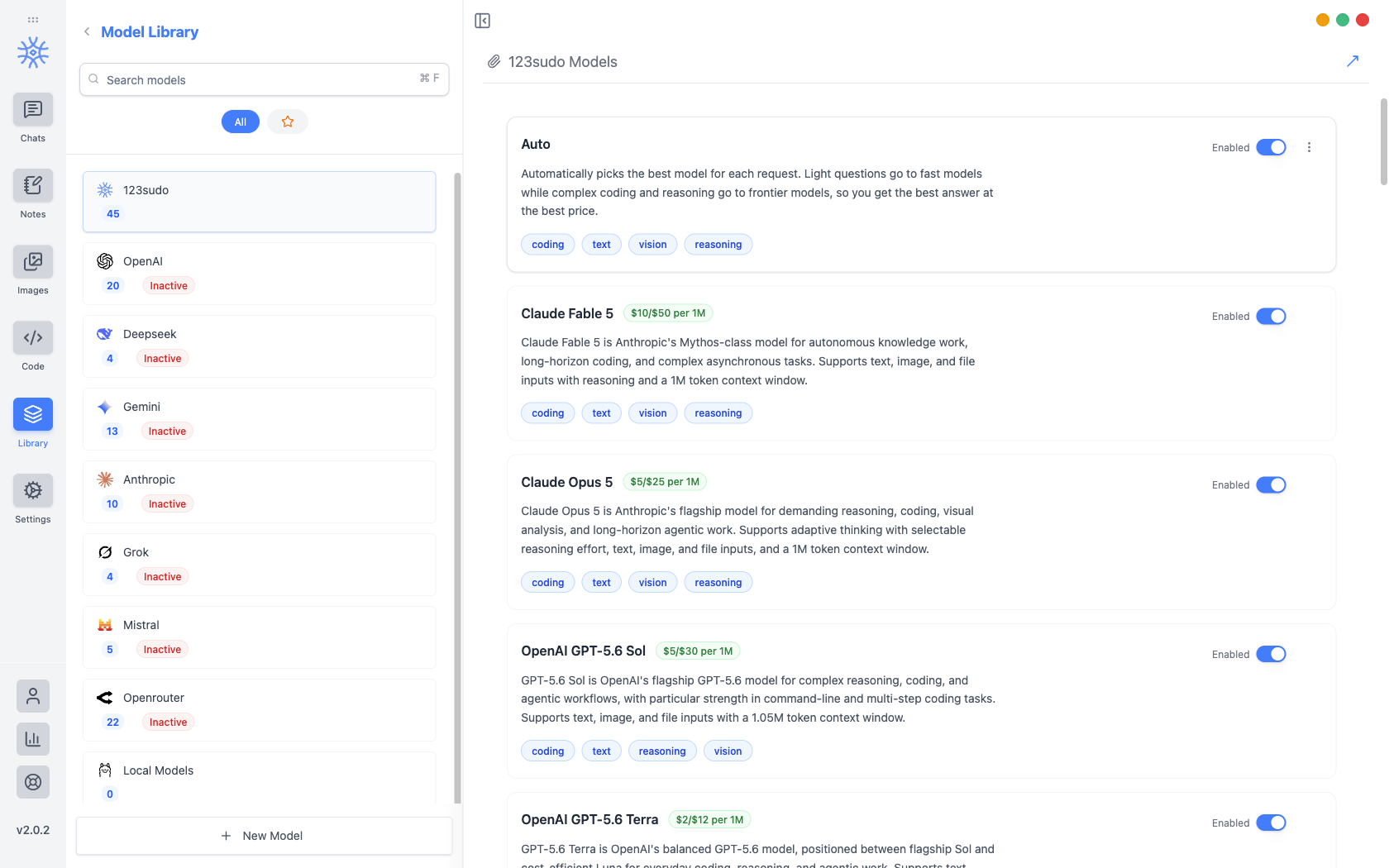
ไลบรารี → โมเดลแสดงรายการทุกโมเดลที่คุณสามารถเลือกและเก็บคีย์ API ที่เข้าถึงได้ ผู้ให้บริการจะเรียงไปทางซ้ายโดยนับโมเดลแต่ละรายการ และผู้ให้บริการจะยังคงไม่ใช้งาน จนกว่าจะมีรหัส
สามวิธีในการเข้าถึงแบบจำลอง
ตัวเลือกใดที่คุณเลือกจะเป็นตัวตัดสินว่าใครจะเรียกเก็บเงินจากคุณและสิ่งที่จะออกจากเครื่องของคุณ
| เส้นทาง | ใครเป็นคนเรียกเก็บเงินคุณ | สิ่งที่ออกจากเครื่องของคุณ |
|---|---|---|
| เครดิต 123sudo | 123sudo จากยอดเครดิตของคุณ | ข้อความของคุณถึงผู้ให้บริการที่เรากำหนดเส้นทางไป |
| คีย์ API ของคุณเอง | ผู้ให้บริการในบัญชีของคุณ | ข้อความของคุณถึงผู้ให้บริการรายนั้น |
| ท้องถิ่นผ่าน Ollama | ไม่มีใคร | ไม่มีอะไร |
โมเดลท้องถิ่นได้รับการตั้งค่าใน โมเดลในเครื่อง และการแลกเปลี่ยนความเป็นส่วนตัวครอบคลุมอยู่ใน Privacy
การเพิ่มรหัสผู้ให้บริการ
Pick the provider, open API Configuration, and paste the key. It is encrypted before it is written, with the encryption key held in the operating system's keychain rather than in the app, so the stored file is useless on its own. If the OS cannot provide that secure storage, the app says so instead of quietly falling back to writing the key in the clear.
ผู้ให้บริการจะพลิกเป็น ใช้งานอยู่ เมื่อบันทึกคีย์แล้ว และโมเดลของคีย์จะสามารถเลือกได้ทุกที่ที่สามารถเลือกโมเดลได้
ปฏิบัติต่อคีย์ API เหมือนรหัสผ่าน ใครก็ตามที่ถือครองสามารถใช้จ่ายกับบัญชีผู้ให้บริการของคุณได้ โดยจะไม่รวมอยู่ในการส่งออก และไม่ควรปรากฏในภาพหน้าจอหรือข้อความสนับสนุน
การเรียกดูและการเพิ่มโมเดล
Browse Models fetches the provider's current catalogue (Anthropic, OpenAI, Gemini, Mistral, DeepSeek, or OpenRouter) so you can search it by name or ID and add several at once. Models already in your library are marked Added.
Fetching the catalogue is how a newly released model appears the day it launches, without waiting for an app update.
To add something the catalogue does not list (a proxy, a self-hosted endpoint, a preview model), add it by hand with its Model Engine, Model ID, Model Name, Model Base URL, and Model Purpose. The purpose is what makes it offerable in the right places, so a vision model is proposed where images are involved.
Free and Pro models
Every model on your own API key or running locally works on every plan, with no limits from 9xChat.
For models billed to your 9xChat credits, a free account can use a set of fast, capable models, and Pro unlocks the full catalogue, frontier models included. A locked model is dimmed in the picker; choosing it on a free account explains that it needs Pro. The 3-day trial unlocks every model, so you can find your favourite before deciding.
กำลังอ่านรายการ
Each model shows its price per million tokens and what it is suited to (coding, text, vision, reasoning), so capability can be weighed against cost before you commit a long conversation to it. In the chat model picker the same information appears as a badge: Premium ($$$), Standard ($$) or Eco ($).
เลื่อนขึ้นและย้ายลง จัดลำดับผู้ให้บริการใหม่ ลำดับคือลำดับที่คุณเห็นเมื่อเลือกรุ่น ดังนั้นการใส่สิ่งที่คุณใช้จริงไว้ด้านบนสุดจะคุ้มค่ากับเวลาสิบวินาที
อัตโนมัติ
รถยนต์ อยู่ในอันดับต้นๆ ของรายการ 123sudo และเลือกมาให้คุณ โดยส่งคำถามสั้นๆ ไปยังรุ่นที่รวดเร็วและราคาถูก และคำถามที่ยากไปยังรุ่นชายแดน
It is the right default when you do not want to think about it, and the wrong one when you need a specific model's behaviour, in which case name the model rather than letting the router choose.
รุ่นไหนทำอะไร.
แชท บันทึกย่อ รหัส รูปภาพ และชื่อที่สร้างขึ้นใหม่จะเริ่มต้นด้วยค่าเริ่มต้นของตัวเอง สิ่งเหล่านี้ถูกกำหนดไว้ใน Settings → Default Models และเธรดใด ๆ ก็สามารถย้ายไปยังรุ่นอื่นได้โดยไม่ต้องเปลี่ยนแปลง