
उपकरण, कौशल और एमसीपी
अंतर्निहित उपकरण क्या करते हैं, कौशल उत्तरों को कैसे आकार देते हैं, और एमसीपी सर्वर को सुरक्षित रूप से कैसे कनेक्ट किया जाए।
लाइब्रेरी में तीन चीजें सहायक को बात करने से ज्यादा कुछ करने देती हैं, और वे अलग-अलग तरीके से काम करती हैं ताकि उन्हें अलग किया जा सके।
Using tools, skills and MCP servers in chat is part of Pro, and included in the 3-day trial. On a free account you can still browse, create and configure all of them, and the assistant can always save memories. See Free and Pro.
| यह क्या है | यह कहां से आता है | |
|---|---|---|
| उपकरण | एक फ़ंक्शन जिसे मॉडल कुछ करने के लिए कॉल कर सकता है | Over 25 built in, or write your own |
| कौशल | निर्देश जो सहायक उत्तर कैसे देते हैं | 3 निर्मित, या अपना खुद का लिखें |
| एमसीपी सर्वर | किसी और का टूल संग्रह, मॉडल कॉन्टेक्स्ट प्रोटोकॉल से जुड़ा हुआ है | सामुदायिक सूची, या अपनी स्वयं की सूची जोड़ें |
औजार
Library → Tools lists everything the model can call. The built-in set covers the web, your own workspace and a browser:
-
The web: Search Web, Read Webpage, YouTube Transcript, Capture Screenshot
-
Your workspace: Search Knowledge, Search Attachments, View Attachment, Search Conversations, Summarize Thread, Manage Notes, Manage Memory
-
Making things: Generate Image, Generate Document (a PDF, Word or text file you can download)
-
Working with you: Ask User, Manage Todos, Cite Sources, Get Current Time
-
The browser pane (desktop): Open Browser, Observe Browser, Act in Browser, Extract Page, Screenshot Browser, Page Errors, Browser Tabs, Find in Page, Download File, Attach Files to Page
Tools marked Core (Manage Memory, Ask User, Cite Sources, Manage Todos and Read Skill among them) are always on, because the others rely on them. Every other tool has Enable tool and Disable tool, so you can turn off anything you would rather the model never reach for.
एक उपकरण वास्तव में क्या करता है
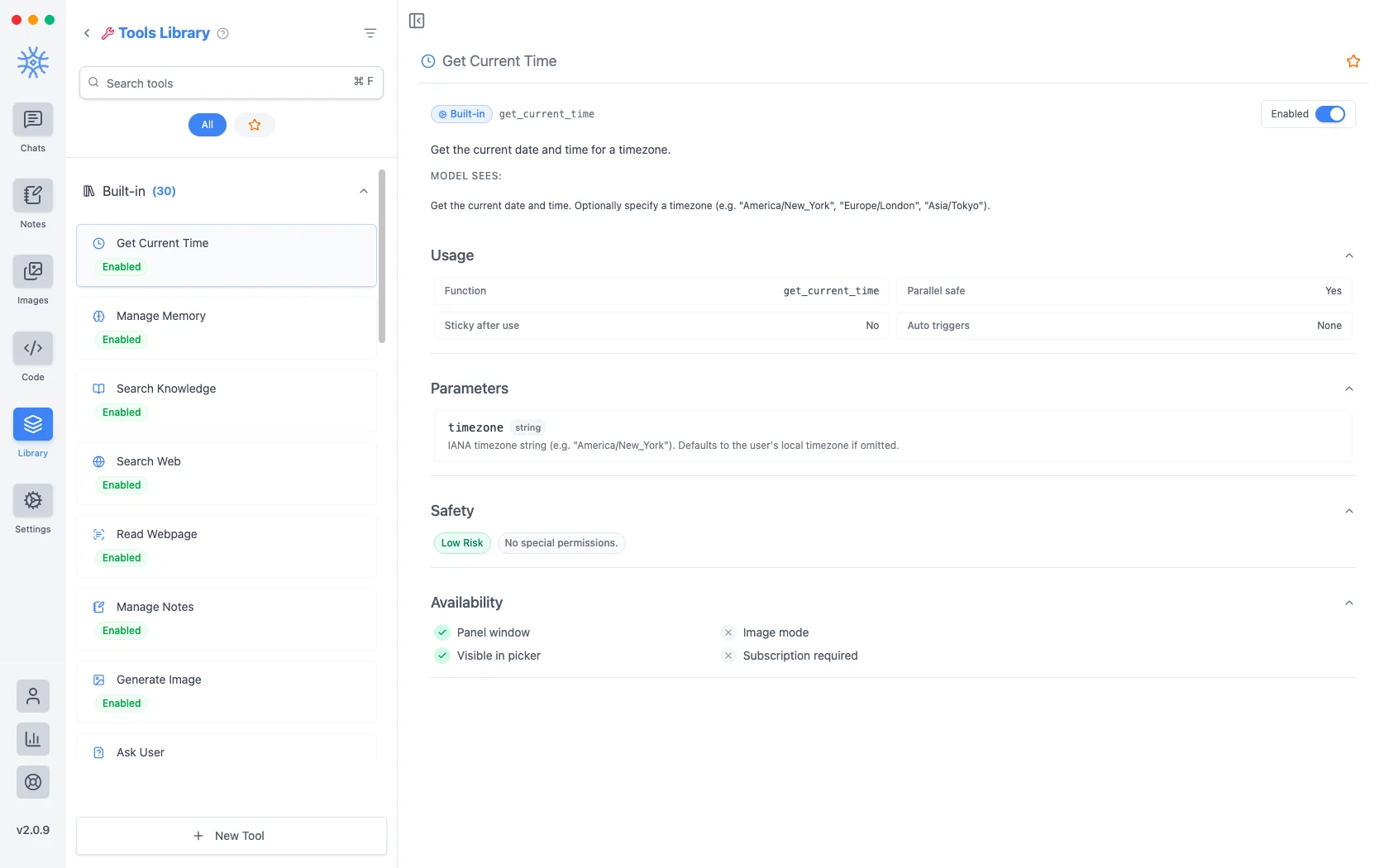
कोई भी टूल खोलें और पूरा अनुबंध स्क्रीन पर होगा, जो असामान्य और उपयोग करने लायक है।
-
मॉडल देखता है वह शाब्दिक विवरण है जिसे मॉडल निर्णय लेते समय पढ़ता है टूल को कॉल करना है या नहीं.
-
उपयोग फ़ंक्शन का नाम बताता है, कि क्या इसे समानांतर में चलाना सुरक्षित है, क्या यह उपयोग के बाद सक्रिय रहता है, और क्या इसे स्वचालित रूप से ट्रिगर कर सकता है।
-
पैरामीटर बिल्कुल वही सूचीबद्ध करता है जो वह स्वीकार करता है।
-
Safety carries a risk level and states what permissions it needs: उदाहरण के लिए, वर्तमान समय प्राप्त करें, कम जोखिमहै औरकोई विशेष अनुमति नहीं है।
-
उपलब्धता से पता चलता है कि यह कहां काम करता है, इसमें यह भी शामिल है कि इसकी आवश्यकता है या नहीं सदस्यता.
जो कुछ भी आपने स्वयं नहीं जोड़ा है उसे सक्षम करने से पहले सुरक्षा पंक्ति पढ़ें। यह "यह क्या पहुँच सकता है" का सबसे त्वरित उत्तर है।
चैट में एक टूल का उपयोग करें
जब आपको कोई विशिष्ट उपकरण चाहिए तो सीधे कार्रवाई के लिए पूछें। उदाहरण के लिए, "इस समय भारत में क्या समय है? वर्तमान समय प्राप्त करें टूल का उपयोग करें।" सहायक टूल चलाता है, इसके परिणाम की प्रतीक्षा करता है, और फिर उस परिणाम से उत्तर लिखता है।
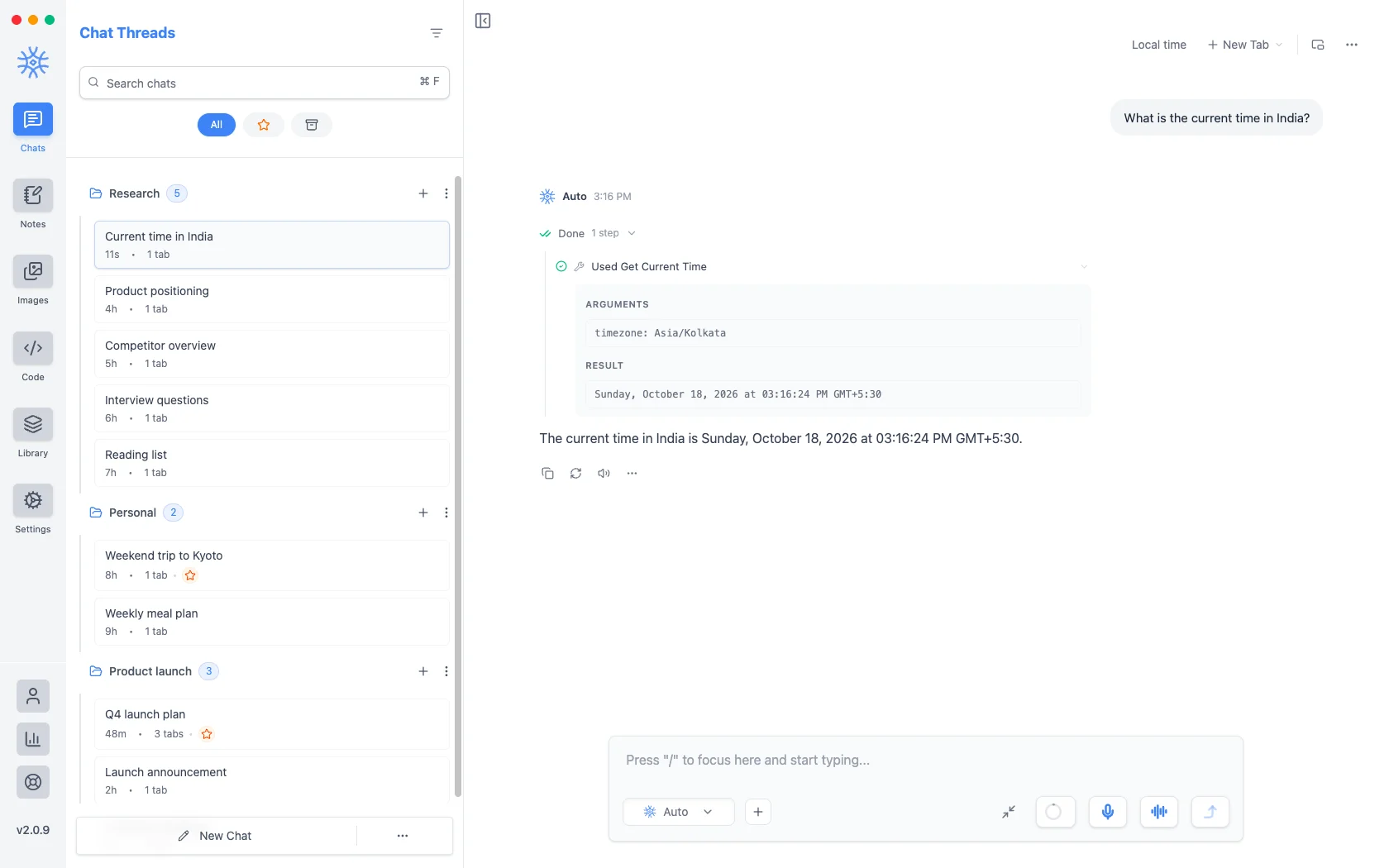
संक्षिप्त पंक्ति रिकॉर्ड करती है कि कौन सा उपकरण चला और कितना समय लगा। मॉडल द्वारा दिए गए तर्कों और उस पर लौटाए गए परिणाम का निरीक्षण करने के लिए पंक्ति चुनें। इससे केवल अंतिम वाक्य पर निर्भर रहने के बजाय कार्य को सत्यापित करना संभव हो जाता है।
कोई टूल क्या भेजता है
वेब खोजेंऔरवेबपेज पढ़ेंइंटरनेट पर एक क्वेरी या यूआरएल भेजें।खोज ज्ञान, खोज अनुलग्नक, और खोज वार्तालाप आपके स्थानीय डेटा को पढ़ते हैं और जो पाते हैं उसे बातचीत में डालते हैं, जो फिर आप जिस भी मॉडल का उपयोग कर रहे हैं उस पर चला जाता है। एक स्थानीय मॉडल यह सब आपकी मशीन पर रखता है; क्लाउड मॉडल ऐसा नहीं करता.
आपके अपने उपकरण
New Tool connects the assistant to any web API. Four tabs set it up:
-
Main: a Title, the Function name the model calls, a Description the model reads, and its Parameters.
-
Request: the Method (GET, POST, PUT, PATCH or DELETE), the Endpoint URL, Request headers, and a Secrets vault for keys, referenced as
{{NAME}}so they never appear in the tool itself. -
Advanced: Enabled, Confirm before run (ask you before every call), Context triggers, and Stay available after first use.
-
Test: Run test calls the endpoint so you can check the result before the assistant uses it.
कार्य सूचियां और सवाल
On longer jobs the assistant keeps a task list with Manage Todos, and Ask User lets it stop and ask you a question with answer cards. Answer the question to let it carry on.
कौशल
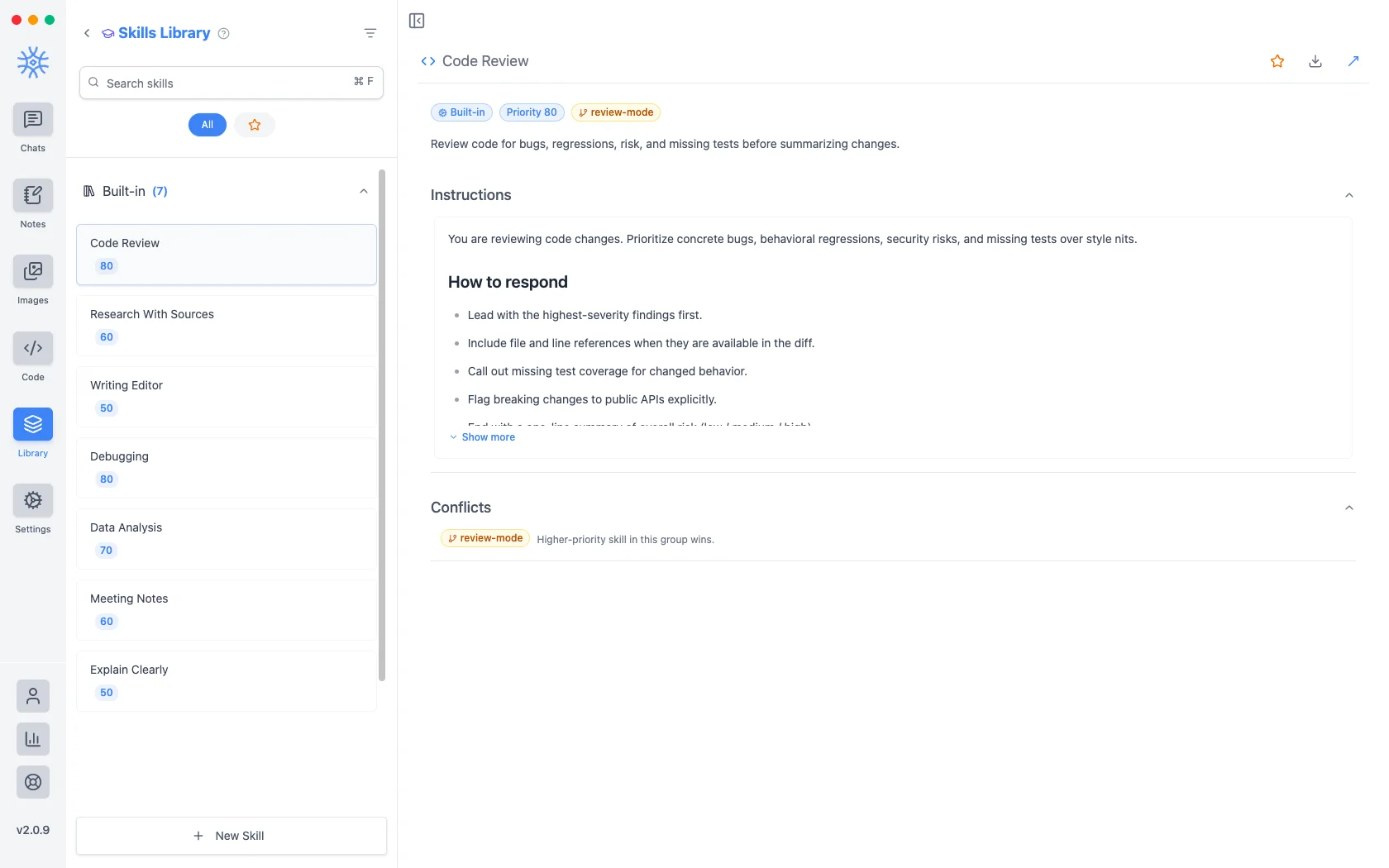
लाइब्रेरी → कौशलनिर्देश सेट रखता है जो सहायक क्या कर सकता है इसके बजाय उत्तर लिखने के तरीके को बदलता है। प्रत्येक कीप्राथमिकता होती है कि एक से अधिक आवेदन करने पर कौन जीतता है।
The three built in are Code Review (priority 80), Research With Sources (60), and Writing Editor (50). Open one and you see its instructions and its How to respond rules. Code Review, for instance, leads with the highest-severity findings, cites file and line where the diff provides them, calls out missing test coverage, flags breaking API changes, and closes with an overall risk rating.
Because skills are just instructions, you can read exactly what one does before enabling it. New Skill lets you write your own, or import one: drop a SKILL.md file on the Import tab, or paste an HTTPS link to one. The import fills in the form for you to review before you save. Download SKILL.md exports a skill to share.
एमसीपी सर्वर
Library → MCP Servers connects external tool collections over the Model Context Protocol, so their tools appear alongside the built-in ones. The Community tab offers ready-made servers such as Filesystem, Memory, Sequential Thinking, GitHub, Brave Search and Postgres; Add MCP Server connects your own.
A server connects one of three ways:
- STDIO (desktop): a program on your computer, with its Command, Args and Environment variables.
- HTTP or SSE: a server on the network, with its URL and Request headers. This is how MCP works on mobile.
Servers that need you to sign in open your browser when you choose Connect, and Forget saved sign-in signs out again. Enabled connects the server when the app starts. Trust Server skips the confirmation before each call, and a local STDIO server must be trusted before it runs.
डेस्कटॉप पर 2.0.9 सुरक्षा अपडेट के बाद ब्राउज़र से साइन इन करने वाले दूरस्थ MCP सर्वरों में दोबारा साइन इन करना होगा। प्रभावित कनेक्शन और प्रक्रिया के लिए 2.0.9 पर अपडेट करने के बाद देखें।
एक जोड़ रहा हूँ
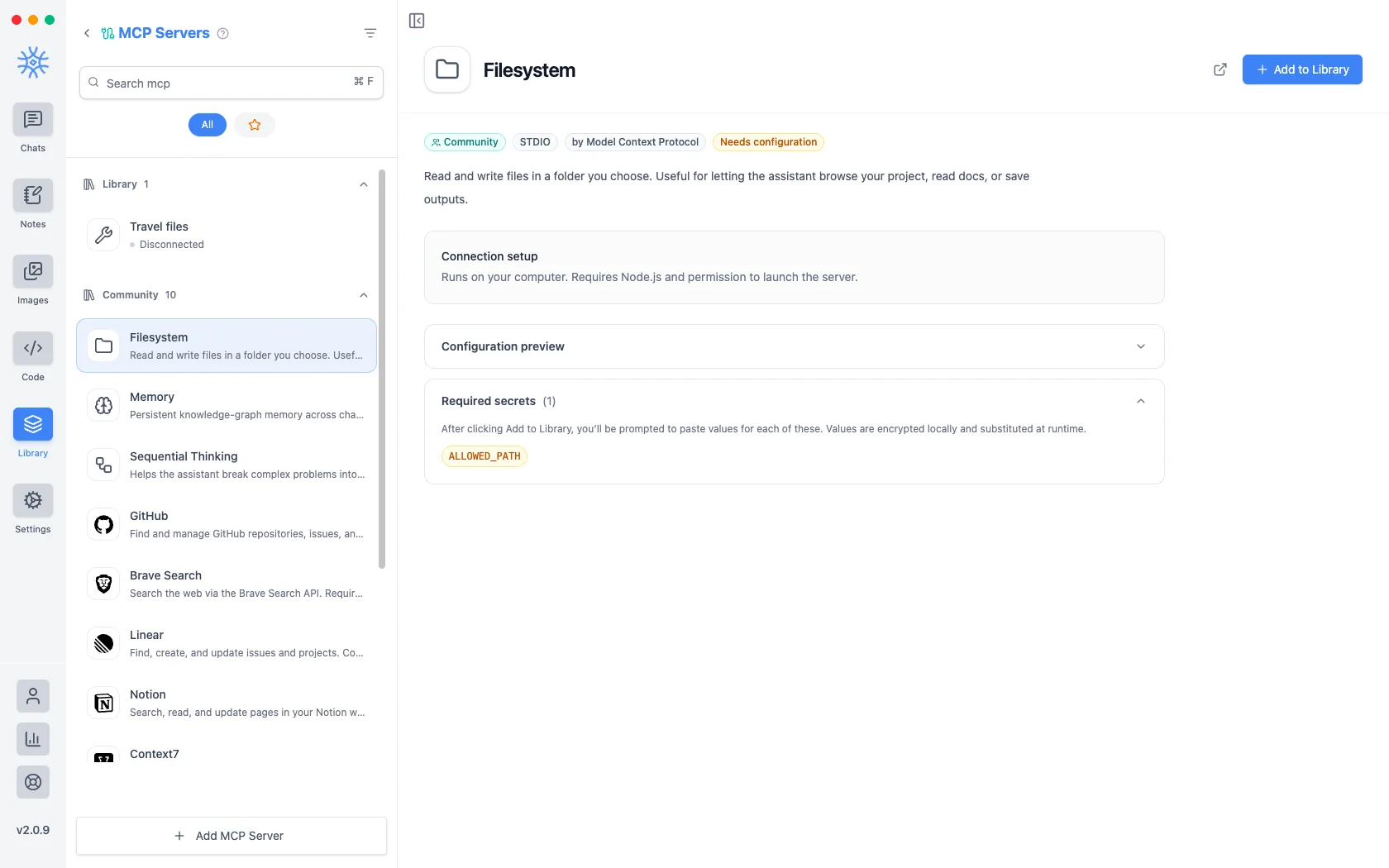
आपके प्रतिबद्ध होने से पहले प्रत्येक प्रविष्टि एक कॉन्फ़िगरेशन पूर्वावलोकन दिखाती है - वह कमांड चलेगी और उसे प्राप्त होने वाले तर्क, ताकि आप देख सकें कि फ़ाइल सिस्टम npx -y @modelcontextprotocol/server-filesystem आपके द्वारा चुने गए पथ पर इंगित किया गया है।
जिन सर्वरों को क्रेडेंशियल्स की आवश्यकता होती है, वे उन्हें आवश्यक रहस्यके अंतर्गत सूचीबद्ध करते हैं और स्वयं कोकॉन्फ़िगरेशन की आवश्यकताके रूप में चिह्नित करते हैं।लाइब्रेरी में जोड़ें चुनने पर आपको प्रत्येक मान के लिए संकेत मिलता है; उन्हें स्थानीय रूप से एन्क्रिप्ट किया जाता है और कॉन्फ़िगरेशन में संग्रहीत होने के बजाय सर्वर चलने पर प्रतिस्थापित किया जाता है।
निर्णय लेना कि किसी को क्या देना है
एमसीपी सर्वर आपकी मशीन पर चलने वाला एक प्रोग्राम है, जिसे आप जो भी एक्सेस देते हैं, उसके साथ चलता है, इसलिए इसे जोड़ने को सॉफ्टवेयर इंस्टॉल करने जैसा समझें:
- Scope it. Filesystem asks for an allowed path. Give it the narrowest फ़ोल्डर जो काम करता है, न कि आपकी होम निर्देशिका।
- आदेश पढ़ें। कॉन्फ़िगरेशन पूर्वावलोकन बिल्कुल वही दिखाता है जो चलेगा।
- उन सर्वरों को प्राथमिकता दें जिन्हें आप पहचान सकें। समुदाय प्रविष्टियाँ उनका नाम बताती हैं प्रकाशक.
- याद रखें कि मॉडल परिणाम देखता है। सर्वर जो भी लौटाता है वह इसमें प्रवेश करता है बातचीत, और वह बातचीत जहां भी जाती है, यात्रा करती है।
Checking connections
On desktop, Settings → Tool diagnostics shows every MCP server with its status (Connected, Connecting…, Disconnected, Failed or Authentication required) and a Test connection button, lists your HTTP tools, and keeps a Recent activity log for the session. Arguments and results are not stored there.
चीज़ों को बंद करना
Every tool can be disabled, skills can be disabled, and an MCP server can be removed from the Library. If the assistant is doing something you did not expect, that is the first place to look: disable the tool, ask again, and see whether the behavior goes away.