
مدل ها و کلیدهای API
How a model is reached, adding providers and keys, browsing and adding models, and what Auto does.
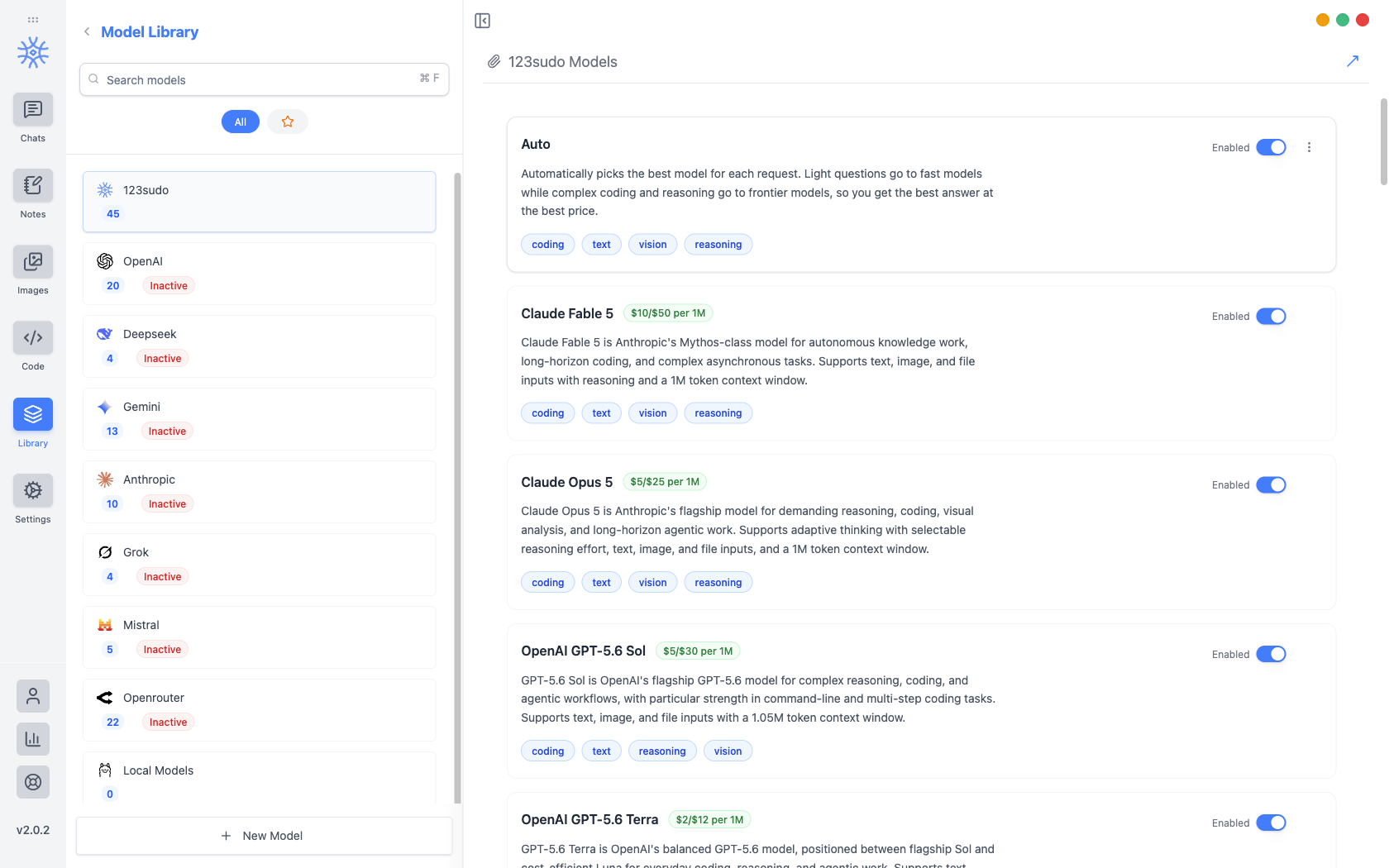
Library → Modelsهر مدلی را که می توانید انتخاب کنید فهرست می کند و کلیدهای API را که به آنها می رسد نگه می دارد. ارائهدهندگان با تعداد مدل هر کدام از سمت چپ پایین میروند و ارائهدهنده تا زمانی که کلید داشته باشدغیرفعال میماند.
سه راه برای رسیدن به یک مدل
کدام یک را انتخاب میکنید هم تصمیم میگیرد چه کسی برای شما صورتحساب میدهد و چه چیزی دستگاه شما را ترک میکند.
| مسیر | چه کسی به شما صورت حساب می دهد | چه چیزی از دستگاه شما باقی می ماند |
|---|---|---|
| اعتبارات 123sudo | 123sudo، از موجودی اعتبار شما | پیام شما، به ارائهدهندهای که ما به آن میرویم |
| کلید API خودتان | ارائه دهنده، در حساب شما | پیام شما به آن ارائه دهنده |
| محلی از طریق اولاما | هیچ کس | هیچی |
مدلهای محلی در مدلهای محلی راهاندازی میشوند و مبادله حریم خصوصی در Privacy پوشش داده میشود.
افزودن کلید ارائه دهنده
Pick the provider, open API Configuration, and paste the key. It is encrypted before it is written, with the encryption key held in the operating system's keychain rather than in the app, so the stored file is useless on its own. If the OS cannot provide that secure storage, the app says so instead of quietly falling back to writing the key in the clear.
پس از ذخیره کلید، ارائهدهنده به فعال میچرخد و مدلهای آن در هر جایی که بتوان یک مدل را انتخاب کرد، قابل انتخاب میشوند.
با یک کلید API مانند یک رمز عبور رفتار کنید. هر کسی که آن را در اختیار دارد می تواند در مقابل حساب ارائه دهنده شما خرج کند. هرگز در صادرات گنجانده نشده است و هرگز نباید در یک اسکرین شات یا پیام پشتیبانی ظاهر شود.
مرور و اضافه کردن مدل ها
Browse Models fetches the provider's current catalogue (Anthropic, OpenAI, Gemini, Mistral, DeepSeek, or OpenRouter) so you can search it by name or ID and add several at once. Models already in your library are marked Added.
Fetching the catalogue is how a newly released model appears the day it launches, without waiting for an app update.
To add something the catalogue does not list (a proxy, a self-hosted endpoint, a preview model), add it by hand with its Model Engine, Model ID, Model Name, Model Base URL, and Model Purpose. The purpose is what makes it offerable in the right places, so a vision model is proposed where images are involved.
Free and Pro models
Every model on your own API key or running locally works on every plan, with no limits from 9xChat.
For models billed to your 9xChat credits, a free account can use a set of fast, capable models, and Pro unlocks the full catalogue, frontier models included. A locked model is dimmed in the picker; choosing it on a free account explains that it needs Pro. The 3-day trial unlocks every model, so you can find your favourite before deciding.
خواندن لیست
Each model shows its price per million tokens and what it is suited to (coding, text, vision, reasoning), so capability can be weighed against cost before you commit a long conversation to it. In the chat model picker the same information appears as a badge: Premium ($$$), Standard ($$) or Eco ($).
حرکت به بالاوحرکت به پایین ارائه دهندگان را دوباره سفارش دهید. ترتیب همان نظمی است که هنگام انتخاب یک مدل می بینید، بنابراین قرار دادن چیزی که واقعاً استفاده می کنید در بالای صفحه ارزش ده ثانیه دارد.
خودکار
Auto در بالای لیست 123sudo قرار دارد و برای شما انتخاب می کند و سؤالات سبک را برای مدل های سریع و ارزان و سؤالات سخت را برای مدل های مرزی ارسال می کند.
It is the right default when you do not want to think about it, and the wrong one when you need a specific model's behaviour, in which case name the model rather than letting the router choose.
کدام مدل چه کاری انجام می دهد
چت ها، یادداشت ها، کدها، تصاویر و عناوین جدید هر کدام به صورت پیش فرض شروع می شوند. آنها در Settings ← مدلهای پیشفرض تنظیم شدهاند، و هر رشتهای را میتوان بدون تغییر به مدل دیگری منتقل کرد.