
Troubleshooting
No lyrics, no detection, lyrics out of time, a wrong match, overlays that will not show.
Almost everything falls into one of two buckets: the song is not being detected, or the song is detected but has no lyrics. Telling them apart takes one look.
Which of the two is it?
Open Settings › Playback. Under Music player there is a line reporting what is being detected right now.
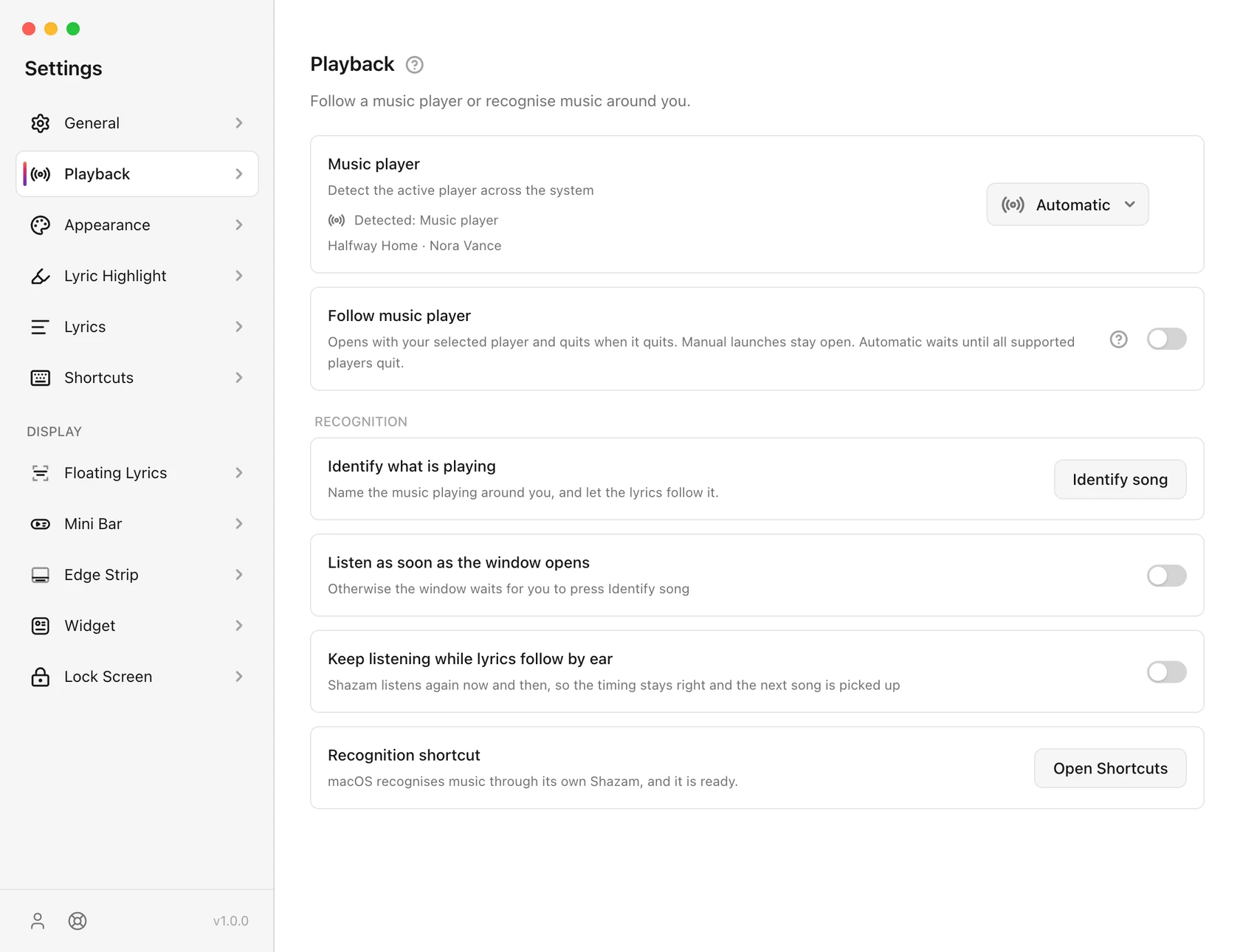
- It names your song: detection is fine. Skip to No lyrics for a song.
- It is empty: carry on here.
Nothing is detected
- Press your keyboard's play/pause key. If it does not control the player, your operating system cannot see it either, and neither can 9xLyrics. That is a player or system setting, not a 9xLyrics one.
- macOS: allow Automation. The first time 9xLyrics reads Music or Spotify, macOS asks. If you dismissed the prompt, the switch is in System Settings › Privacy & Security › Automation. Without it, macOS reports nothing.
- Is something else winning? A paused browser tab can hold the media session. Pin the right app in Settings › Playback › Music player.
- Just woke from sleep? Detection pauses while the machine sleeps and restarts a few seconds after it wakes.
- Linux: the player must speak MPRIS. Nearly all do. A few niche ones do not, and cannot be detected at all.
More detail in Players and detection.
No lyrics for a song
The song is detected and the words never arrive.
- Not every song has synced lyrics. New releases, remixes, live versions, classical, instrumental and non-Latin catalogues are all thinner. 9xLyrics checks several sources; if none of them has it, nobody does.
- Search it yourself. Wrong lyrics? in the Lyrics Window searches all
four and often finds something the automatic match missed, particularly if
the title carries a
(Remastered 2011)the sources do not use. Trimming the title and searching again is the single most effective fix. The Search button on any overlay opens the same search. (Pro.) - Use a video's captions. If the song has a video on YouTube, YouTube link… in Search lyrics turns its captions into lyrics. (Pro.)
- Use your own file. Put an
.lrcbeside your music and point Settings › Lyrics › Your own .lrc files at the folder. A local file beats every online source. - Prefer synced lyrics is on. With it on, a plain-text version is used only when nothing synced exists. If you would rather see unsynced words than none, that is already the behaviour.
Lyrics are out of time
- The whole song is off, and so is every song: Settings › Lyrics › Global lyric delay.
- Only this song is off: the Offset field at the bottom of the Lyrics Window. It is remembered for that song alone.
- It drifts as the song goes on: the lyrics are for a different recording. Search for another match rather than chasing it with the offset.
- A Shazam match is slightly off: timing from a recognition is estimated. Listen again resyncs it.
The lyrics are for the wrong song
Live albums, remasters and covers all collide. Wrong lyrics? in the Lyrics Window searches every source; the lyrics you use are kept for that song, so they are right on every future play too. They survive clearing the cache.
No source has it? Paste the words, load a file, or use a YouTube video's captions with YouTube link…, then time them in the lyrics editor. All of this is Pro.
An overlay will not show
- Check the licence. All desktop overlays, including Floating Lyrics, require Pro or an active trial. See Free and Pro.
- Closed it with X? Choose Tray › Show overlays. Closing temporarily hides an overlay; turning it off in Settings disables it across restarts.
- Hidden on hover? Move the pointer away, or turn off Hide while the mouse is over it on that overlay’s settings page.
- Wrong screen? Settings › General › Show on display.
- Dragged off-screen? Each surface's page has a reset for its position.
- Hidden while paused? Several surfaces have Hide when paused. Press play.
- Full-screen apps and games can cover an always-on-top window. That is the operating system's decision, not a setting in 9xLyrics.
An overlay will not drag or its controls disappear
Move over the overlay to reveal its drag handle. Lock position hides that handle and prevents dragging.
With Click-through on, the overlay stays visible but shows no toolbar, drag handle or hover controls, and every click passes through. Hide while the mouse is over it fades the overlay and passes every click through, whatever Click-through says. Turn both off on that overlay's settings page to reach its controls or drag it. Edge Strip has no drag handle; position it using Dock to.
A shortcut does nothing
The system or another app already holds that combination. The row says so when it happens. Pick another: adding Shift usually clears it. Everything a shortcut does is also in the tray menu.
Nothing happens when I close the window
That is the design: closing Settings leaves 9xLyrics watching in the background. Tray › Quit 9xLyrics quits it.
Lock Screen shows nothing
The Mac Lock Screen card is a Pro feature for macOS. Check that Settings › Lock Screen › Show on the lock screen is on. After a major macOS upgrade, install the latest 9xLyrics update. See Lock Screen.
A message about your UID or sign-in
- This UID was removed after inactivity. The account had been unused for a long time and was removed. 9xLyrics signs you out; create a new UID to start a fresh trial.
- The UID you entered was not found. Check the number against your saved
.txtfile and type it again. - Too many wrong UIDs or Too many attempts. Sign-in pauses for a short while after repeated tries. Wait a moment, then try again with the right number.
- Your computer's clock is about … slow (or fast). 9xLyrics keeps working and corrects for it. Turn on automatic date and time in your system settings to fix the clock itself.
- The server refused this connection. A VPN or proxy can cause it. Turn it off and sign in again.
On Android
- Floating Lyrics does not appear. It needs Show over other apps. Turn it on from Settings › Floating Lyrics, which takes you to the right Android screen, and check you have Pro or the trial.
- No song is detected. 9xLyrics needs notification access to see what your player is playing. Allow it in the setup guide (Settings › General › Setup guide › Show again), then start the song again.
- The notification is missing. On Android 13 and later, apps need permission to show notifications. Settings › Notification › Allow notifications opens it.
- Lyrics stop or drift with the screen off. Set Settings › General › Battery use to Unrestricted, so Android does not pause 9xLyrics to save battery.
Still stuck
Support, with the details listed in Updates and versions.